Recording Plugin — Overview


nematostella-time-series is a napari plugin for
synchronized timelapse recording of Nematostella vectensis with dual-LED
illumination (IR + White) and ESP32-based hardware synchronization.
Key features
-
Hardware-synchronized LEDs
Camera exposure and LED illumination are synchronized via the ESP32 for precise, repeatable timing.
-
Dual-LED illumination
Independent IR (850 nm, exchangeable) and White (broad-spectrum) channels for oblique lighting and light stimulation.
-
Phase-based recording
Automated light/dark cycles for circadian rhythm studies.
-
Drift-compensated timing
Frame timing measured from absolute recording start — no cumulative drift over multi-day runs.
-
LED calibration
Interactive calibration to normalize LED intensities across channels.
-
Zarr & HDF5 storage
Chunked HDF5 with a write-behind queue (
AsyncHDF5Writer), plus Zarr with concurrent read-while-write for live analysis.
Also included: real-time temperature/humidity monitoring (DHT22), a Live
Analysis tab (auto ROI detection via HoughCircles, per-ROI activity every 20 s;
needs opencv-python), a browser-based firmware installer,
and live frame display with recording statistics.
How it works
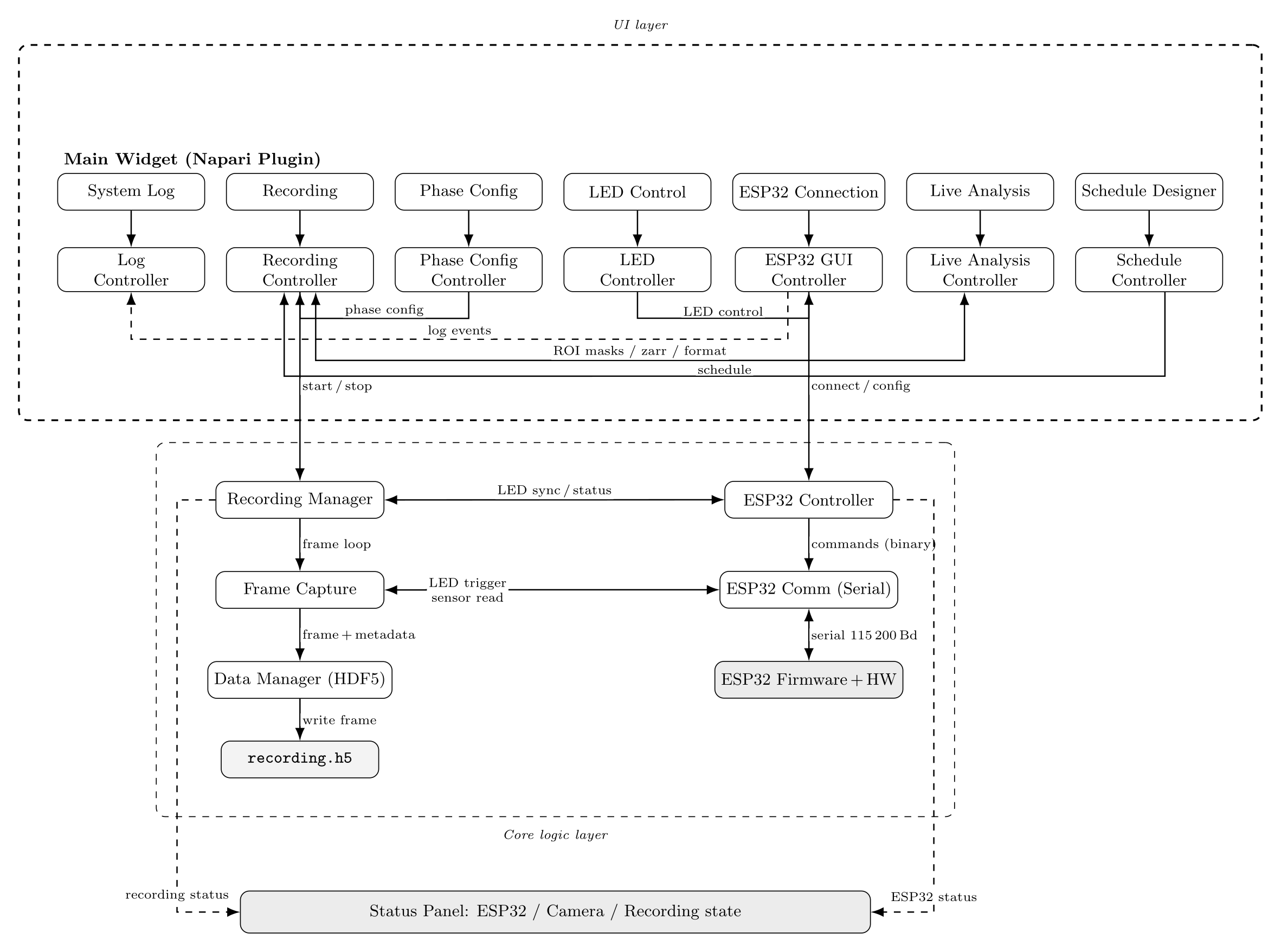
The plugin is organized as a layered recording architecture: a napari UI layer of widgets and controllers on top of a core-logic layer that drives frame capture, ESP32 LED synchronization and HDF5/Zarr storage.
Frame timing
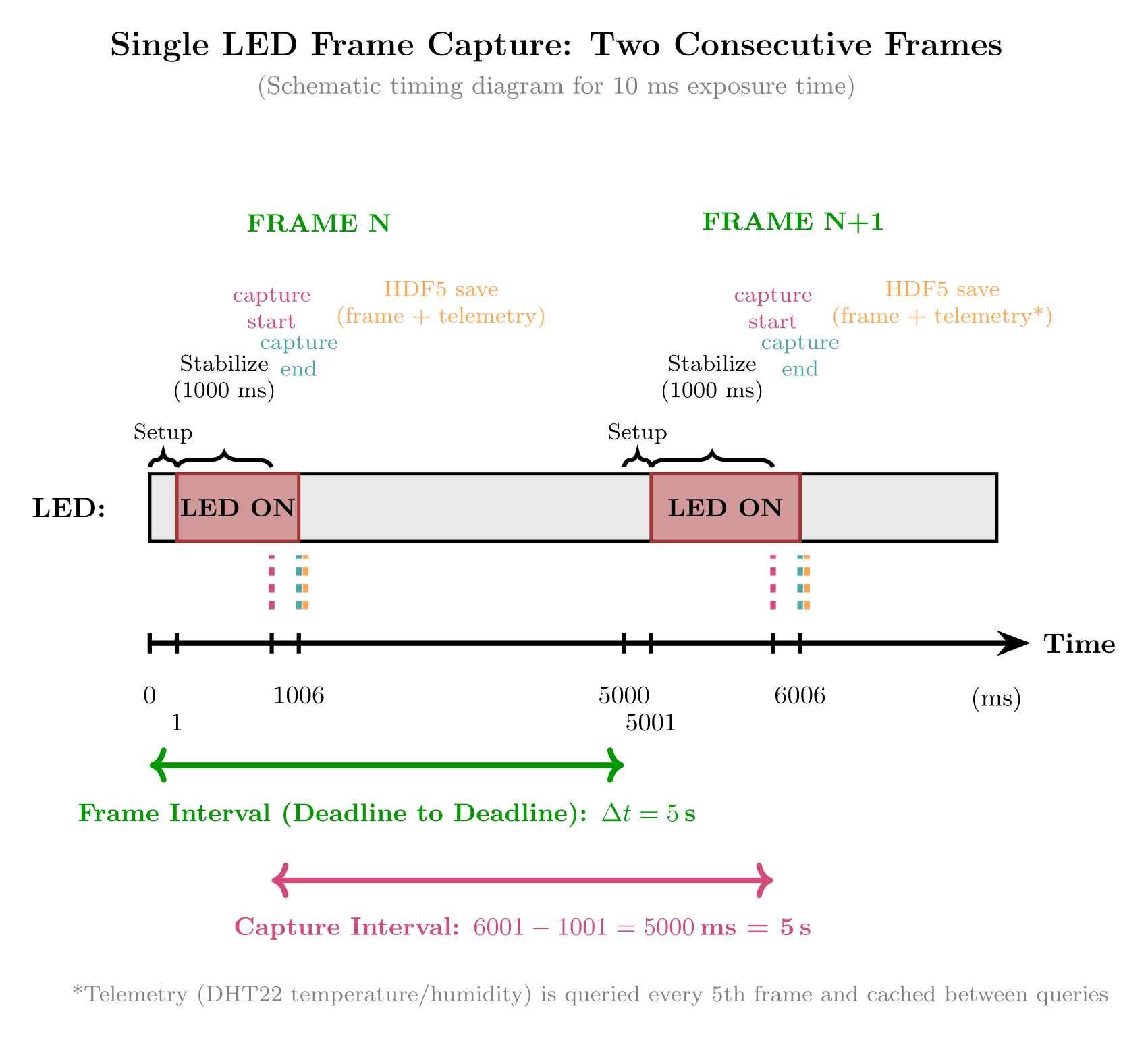
Each frame follows a hardware-synchronized cycle. Inter-frame intervals are referenced to the absolute recording start to avoid cumulative drift; the host plugin keeps full timing control and drives the ESP32 as a remote LED switch.
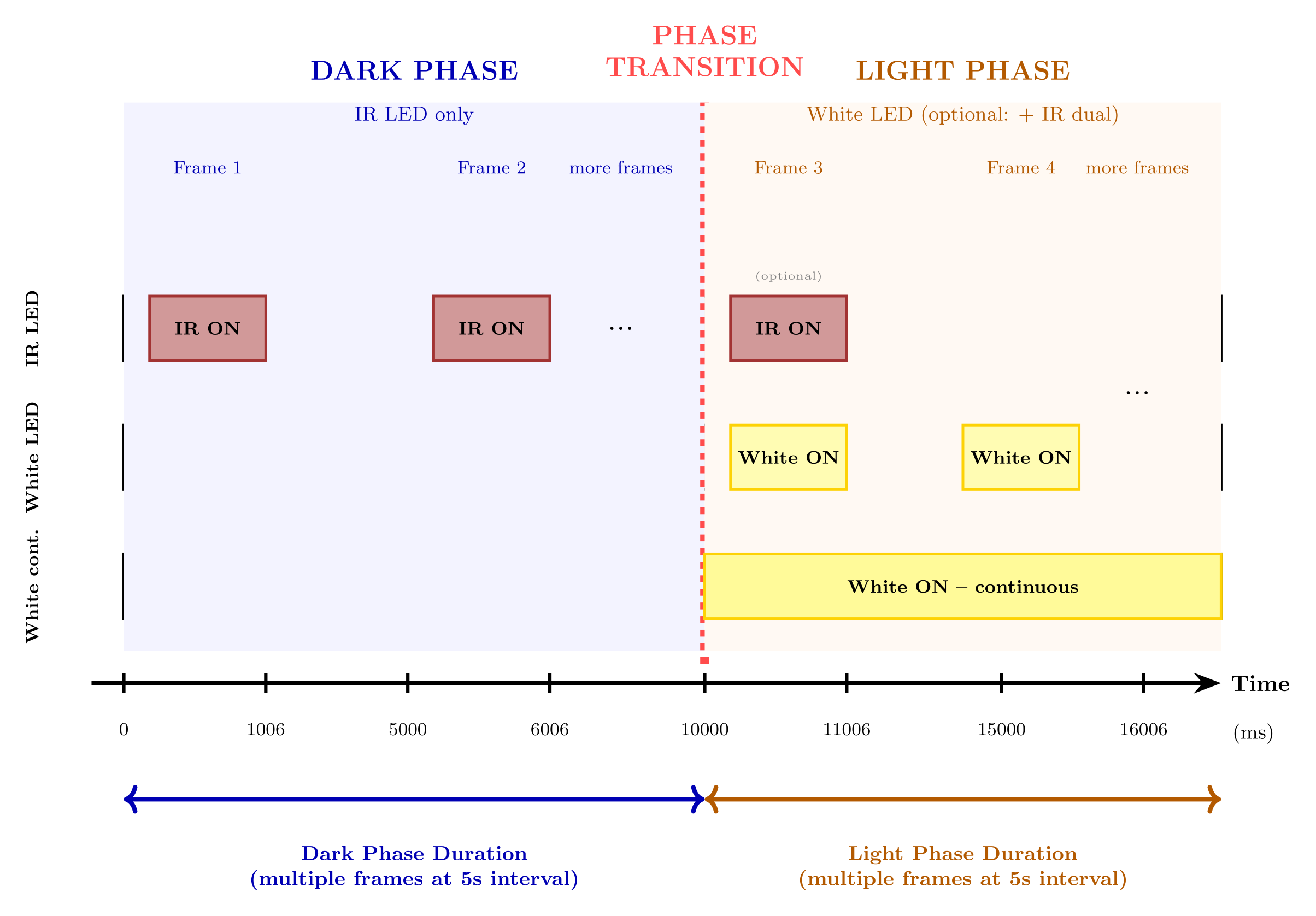
For circadian protocols the plugin alternates IR-only dark phases and white-LED light phases, each containing multiple frames at a configurable interval.
Calibration & recording pipeline
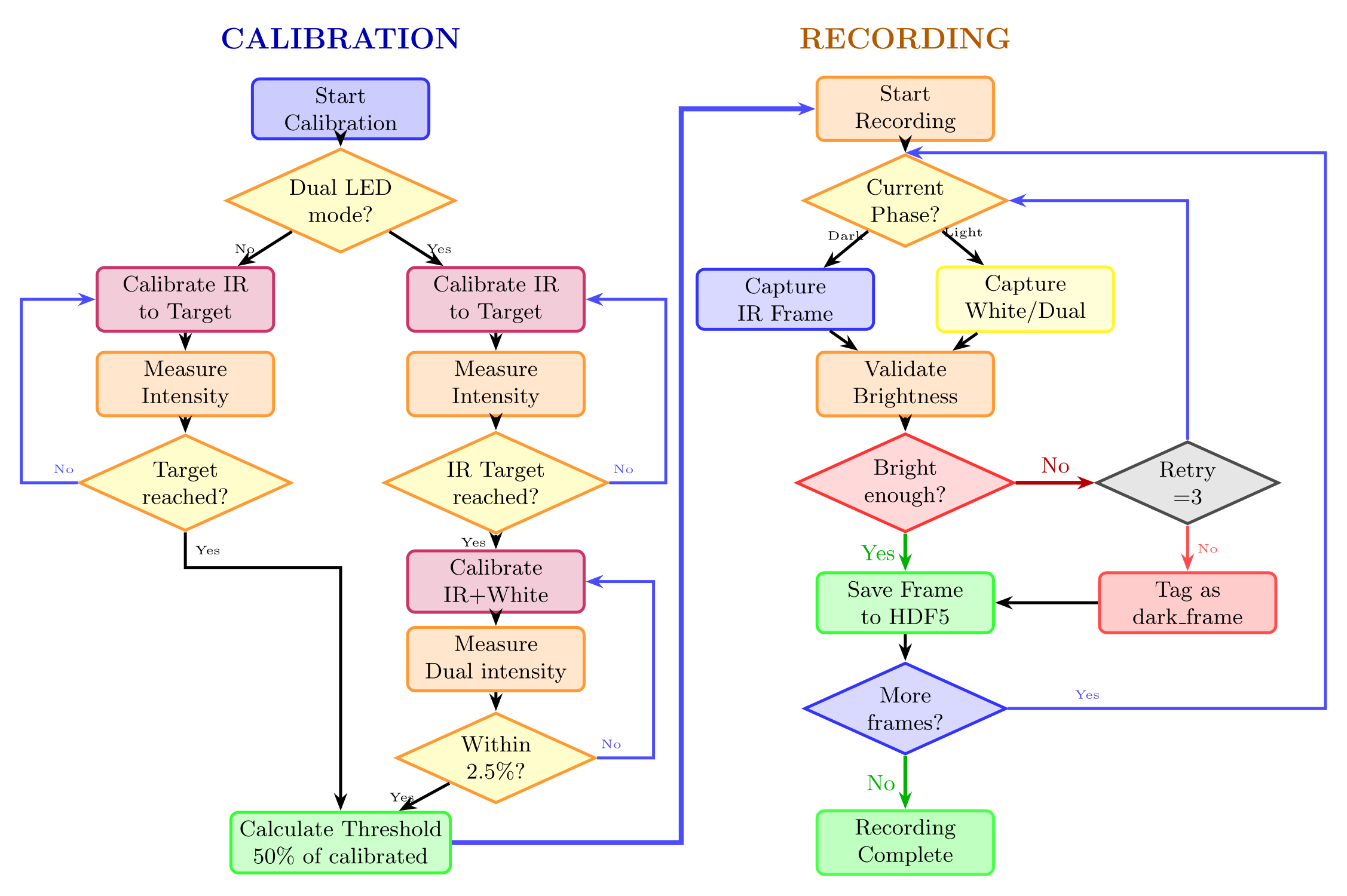
Before recording, LED powers are calibrated to a common target intensity; during recording each frame is brightness-validated as it is written to disk.
Get started
The imager runs as one stack: ImSwitch drives the HIK GigE camera and pushes the live image into napari, and this plugin reads its frames from that napari layer while it controls the ESP32. ImSwitch, napari and the plugin therefore have to be installed into the same environment, and all requirements have to be in place before ImSwitch is started for the first time.
Full walkthrough
Software Setup explains every step below in detail, including how to verify the camera, what each field of the setup JSON means, and a troubleshooting table.
-
Create the
imswitch21conda environment — one environment for ImSwitch, napari and the plugin.Use this environment for every step below and for every later start.
-
Install the Hik Robotics SDK — the camera is driven by ImSwitch's
HikCamManager, which binds to Hikrobot's MVS SDK. Install the MVS package from the Hikrobot download center before ImSwitch, then check in the MVS client that the camera is listed (camera and network adapter must be in the same subnet). -
Install ImSwitch — use our fork, branch
nematostella-rig. It is openUC2's ImSwitch 2.1.191 plus three commits this rig needs, and providesHikCamManagerand the UC2ESP32Manager. Upstream does not work: the Qt GUI aborts on startup,fcntlis missing on Windows, andsetLaserGalvo()does not exist — see Software Setup.git clone -b nematostella-rig https://github.com/s1alknau/ImSwitch.git cd ImSwitch pip install -e . pip install "PySide6==6.8.3" qtpy napari pyqtgraph qdarkstylepip install -e .installs no GUI packages, so the second line is not optional: withoutqtpyImSwitch aborts at startup withModuleNotFoundError: No module named 'qtpy'. On the Qt 5 path,pip install -e ".[PyQt5]"covers the same set.Then switch psygnal to its uncompiled modules — otherwise napari's plugin discovery dies inside ImSwitch with
TypeError: 'object' object is not subscriptable:Don't start ImSwitch yet — finish step 5 first. The configuration folder
~/ImSwitchConfig/with itsimcontrol_setups/subfolder is created on the first start; create it now (mkdir -p ~/ImSwitchConfig/imcontrol_setups) so the next step can already place the setup file. -
Add the camera setup file to
imcontrol_setups— copyJson+cam_manager/example_uc2_ddorf_hik_imager_IR.jsoninto~/ImSwitchConfig/imcontrol_setups/, adjustserialport(ESP32 port) andcameraListIndex, then select it in ImSwitch as the active setup and restart. -
Install the napari plugins — still inside the activated
imswitch21environment. None of them is on PyPI, all install from source:git clone https://github.com/s1alknau/Nematostella-time-series.git cd Nematostella-time-series && pip install -e . && cd .. git clone https://github.com/s1alknau/napari-hdf5-activity.git cd napari-hdf5-activity && pip install -e ".[zarr]" && cd .. git clone https://github.com/s1alknau/napari-lsft.git cd napari-lsft && pip install -e ".[control,stream]" && cd ..Recording needs napari ≥ 0.4.19; the analysis plugin sets the Python floor at 3.12, which is why step 1 creates a 3.12 environment. Optional:
pip install -e ".[opencv]"for the recording plugin's Live Analysis tab. -
Build the imager — see Hardware & Assembly, the Hardware Photos and the 3D-Printed Parts.
-
Flash the ESP32 — open the Firmware Installer in Chrome/Edge (no toolchain required). The ESP32-S3-BOX-3 (Alternative) board is also supported.
-
Record — start ImSwitch from the
imswitch21environment, load the setup and start the live view:Then open Plugins → Nematostella Timelapse Recording in the napari viewer and connect the ESP32 in the plugin's ESP32 Connection tab. Without a HIK camera, start a plain
naparisession instead.
Without a HIK camera
The plugin also runs in a plain napari session — steps 2–4 are only needed
for the ImSwitch/HIK GigE camera path.
Full assembly instructions
The complete, step-by-step hardware assembly guide lives in the project README on GitHub. The Hardware & Assembly page here summarizes the wiring and pinout you need most often.
Next steps
- Follow the detailed Software Setup if anything above fails.
- Analyze your recordings with the Analysis Plugin.
- Review the light/dark Circadian Protocol.
- See the Changelog for release history.